MEDICAL REPORT ORGANIZER
How to Organize Medical Reports on Your Phone
A medical report organizer should make health paperwork easier before the stressful moment arrives. The best system is simple: separate records by person, preserve originals, add dates and document types, and keep practical care details close to the reports.
Most health paperwork becomes difficult because it was never organized at the time it arrived. A lab PDF lands in WhatsApp, a prescription is photographed after a visit, a discharge summary is saved in email, and a printed report goes into a folder. Months later, someone needs it urgently.
Start with people, not files
For families, the most important organizing rule is profile separation. A report for a parent should not mix with a child's vaccination record or a spouse's prescription. A good medical report organizer should keep records attached to the right family member from the beginning.
Keep the original report
Even when an app extracts values, the original document matters. Doctors may need the lab name, sample date, reference range, units, and notes. The original also helps correct OCR mistakes. A useful organizer keeps the original PDF or image available alongside any extracted values.
Use document types and dates
Dates are often more useful than filenames. A report called report_final.pdf is not helpful six months later. Organize by report date, document type, and person. Common groups include lab report, prescription, discharge summary, scan, vaccination, insurance, and note.
Add care context
Medical reports rarely stand alone. A prescription may connect to a medicine schedule. A lab report may connect to a biomarker trend. A diagnosis note may connect to emergency details. A practical health records app should help families keep that context close without turning the app into a medical advice system.
How AyuVault helps
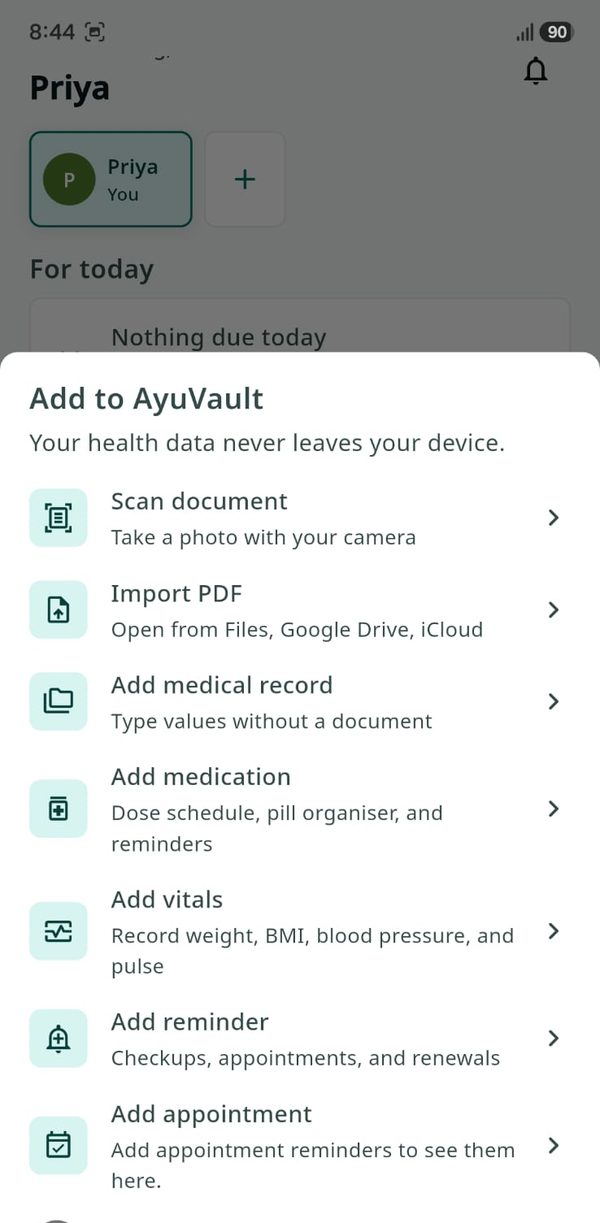
AyuVault organizes records around family profiles. Users can scan paper reports, import PDFs or images, review OCR-extracted values, track selected biomarkers and vitals, manage medicines, and keep emergency details ready. Core record keeping works offline, and the local vault is encrypted on the device.
AyuVault is built for everyday health paperwork in India and globally: WhatsApp PDFs, lab reports, paper prescriptions, older files, doctor visits, and family care coordination. It is not a medical device and does not provide diagnosis or treatment advice.
A simple workflow
- Create or choose the family member profile.
- Scan the report or import the PDF/image.
- Add the report date and document type.
- Review extracted values before saving them.
- Add medicines, reminders, vitals, or notes when relevant.
- Create encrypted backups regularly.
Bottom line
Good organization is not about storing more files. It is about making the right information easy to find, verify, and share intentionally. AyuVault focuses on that practical flow: records by profile, originals preserved, values reviewed, care details connected, and backups under user control.
Frequently asked questions
What is the easiest way to organize medical reports?
Separate reports by family member, add dates and document types, keep originals, and review any extracted values before saving them.
Can AyuVault organize reports for multiple family members?
Yes. AyuVault supports multiple family profiles so records, medicines, vitals, and emergency details can stay separated by person.
Should I keep original medical report PDFs?
Yes. Original reports preserve lab details, reference ranges, units, and notes that may be important during a doctor visit.